

Potted Plant Care app aim to help users diagnose and treat houseplant issues easily. It combines diagnostic tools, personalized care routines, and simple solutions to support plant health, regardless of users’ experience levels.
My role:
UX Designer: conducting user research, creating wireframes, designing prototypes, developing visual elements, ensuring accessibility, and aligning the design with the overall brand identity to deliver an intuitive and user-friendly experience.
The problem:
Plant owners often struggle to identify and address plant health issues due to overwhelming and inconsistent information. There is a lack of a centralized, user-friendly tool that provides clear solutions for plant care, especially for those with varying levels of experience.
Project duration:
Two months
The goal:
The app will offer intuitive diagnostics, actionable solutions, and personalized care plans to guide plant owners through common issues. It will be designed for accessibility, ensuring ease of use for all users, regardless of tech proficiency, and enhance the overall experience for plant care enthusiasts.
Understanding the User
Summary
Plant owners, ranging from beginners to experienced house planters to understand their pain points, plant care routines, and challenges when diagnosing plant issues. I gathered insights on the tools they currently use, their frustrations with existing resources, and what features they would find most helpful.This research informed the development of a user-friendly interface, clear diagnostics, and personalized care plans, ensuring the app meets the needs of various user levels and preferences
Pain Points
1
Users often struggle to identify plant problems due to insufficient or confusing information.
Personas
User journey map
2
Many users feel overwhelmed by the vast amount of conflicting advice available online.
Problem statement:
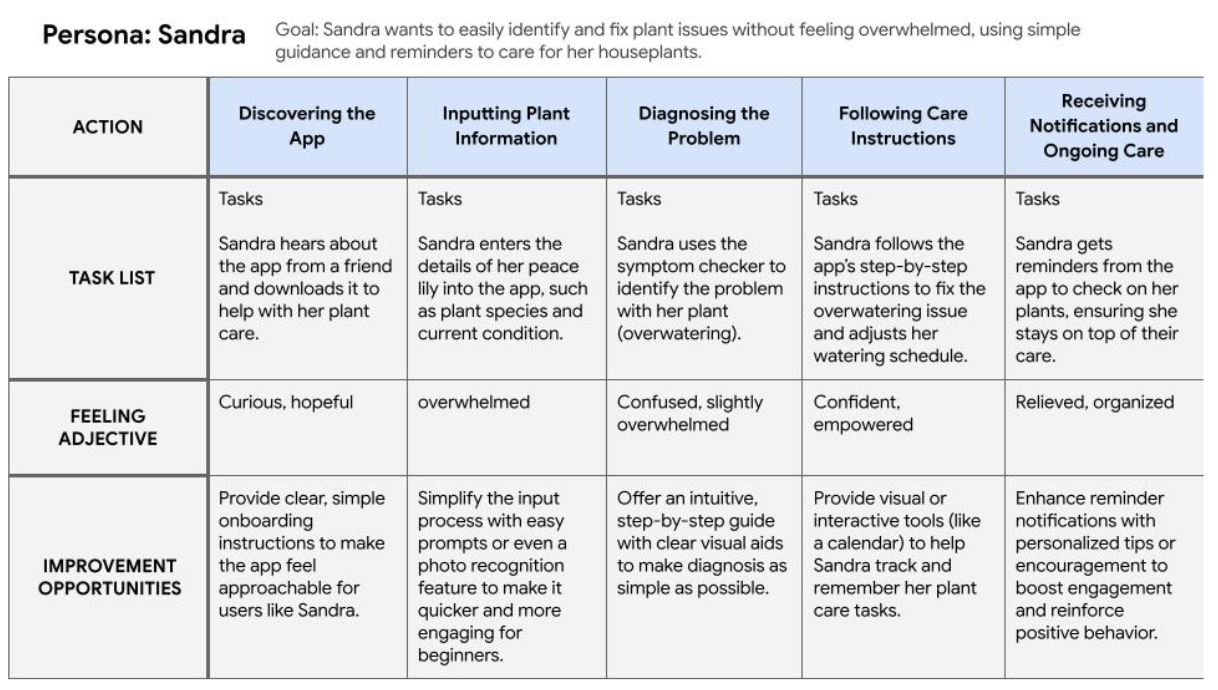
Sandra is a 67-year-old retired nurse who needs a simple, easy-to-use plant care tool because she struggles to remember plant care tasks and finds online resources overwhelming and confusing.
By making the app simple and helpful, Sandra can feel confident and successful in caring for her plants.
3
Users have difficulty managing plant care without a structured routine or reminders.
4
Beginners and users with low tech proficiency often find plant care apps complicated and difficult to navigate.

Competitive Audit

Strengths: Plantix is highly focused on professional and agricultural users, offering AI-driven diagnostics and crop management tools. Its clean design and AI-powered diagnostics make it a strong choice for farmers and those with more serious plant care needs.
Challenges: The app can be overwhelming for casual users due to its complexity, and its professional focus might alienate beginner gardeners. The desktop website can feel cluttered, and accessibility features are limited.

Strengths: PictureThis stands out with its user-friendly design, quick plant identification, and clear care instructions. It is approachable for home gardeners and plant enthusiasts, with an engaging brand identity and community features.
Challenges: Some features are locked behind a paywall, limiting the experience for free users. The desktop website lacks the fluid navigation of the mobile app, and the content might feel too basic for more advanced gardeners..

Strengths: Flora offers a modern, clean interface with excellent plant identification and care advice, and integrates community features for plant sharing. It’s great for beginners and intermediate users with its easy-to-understand content and simple navigation.
Challenges: Premium features are behind a paywall, and the app can be slow at times. Navigation can be cumbersome due to sub-menus, and it lacks advanced plant care tools for expert users.
The Design Process
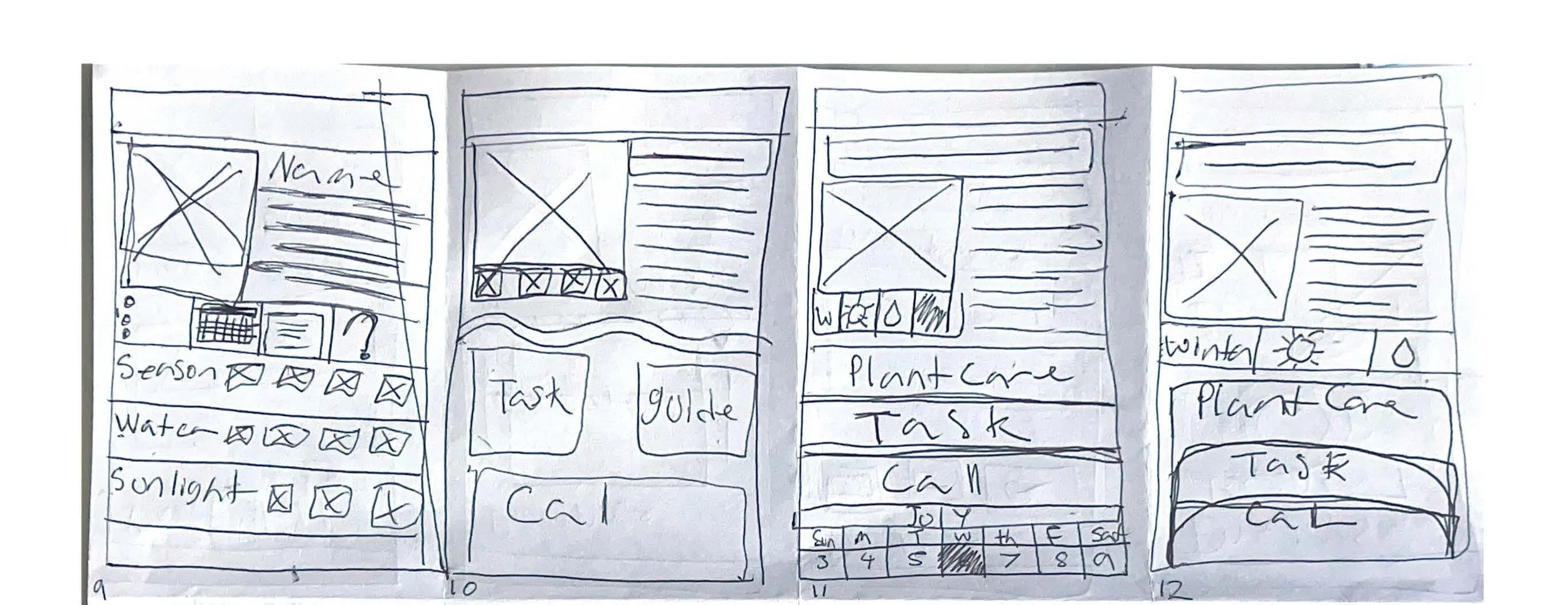
Paper wireframes
Digital wireframes


Low-fidelity prototype

The Final Design
Usability Study Wireframes
[Your notes about goals and thought process]


High-fidelity prototype
user needs a better way to schedule so I refind schedule, and user needs a way to confirm things so I refind an account pop up
Impact:
The design of the potted plant care app simplifies plant diagnostics and care, making it more accessible and enjoyable for users, especially beginners. One study participant noted, “The app made plant care feel less intimidating, and I finally feel confident in keeping my plants healthy.”
Takeaways
What I learned:
I learned to create user-friendly designs for all users, balancing simplicity and functionality. Clear visual aids, intuitive navigation, and personalized features enhance user confidence and engagement.