

The SF School Bus Finder Website is designed to effectively assist parents and students in locating accurate bus route details and stop information in a timely manner. This platform aims to streamline the process, ensuring that all users can navigate their bus schedules with ease and confidence.
My role:
UX Designer: conducting user research, creating wireframes, designing prototypes, developing visual elements, ensuring accessibility, and aligning the design with the overall brand identity to deliver an intuitive and user-friendly experience.
The problem:
Parents and students struggle to access accurate and real-time bus route and stop information. The current tools lack mobile compatibility and are difficult to navigate, leading to frustration and missed buses.
Project duration:
One month
The goal:
Website will provide parents and students with a streamlined and intuitive platform for accessing bus routes and stop information. It will include features like real-time tracking, customizable alerts, and saved routes, ensuring a personalized and efficient user experience.
Understanding the User
Summary
To gain a deeper understanding of the specific needs and preferences of both parents and students, we conducted user interviews, detailed surveys, and comprehensive usability tests that involved a diverse group of six participants. The research primarily focused on exploring their experiences with the existing school bus tracking tools currently being utilized, as well as gathering insights into their expectations and desires for a significantly improved and more user-friendly platform in the future.
Pain Points
1
Parents and students often encounter inaccurate or outdated bus schedules, leading to missed buses and confusion.
Personas
User journey map
2
Many existing tools do not provide real-time tracking, forcing users to wait outside for extended periods without knowing the bus's exact location.
Problem statement:
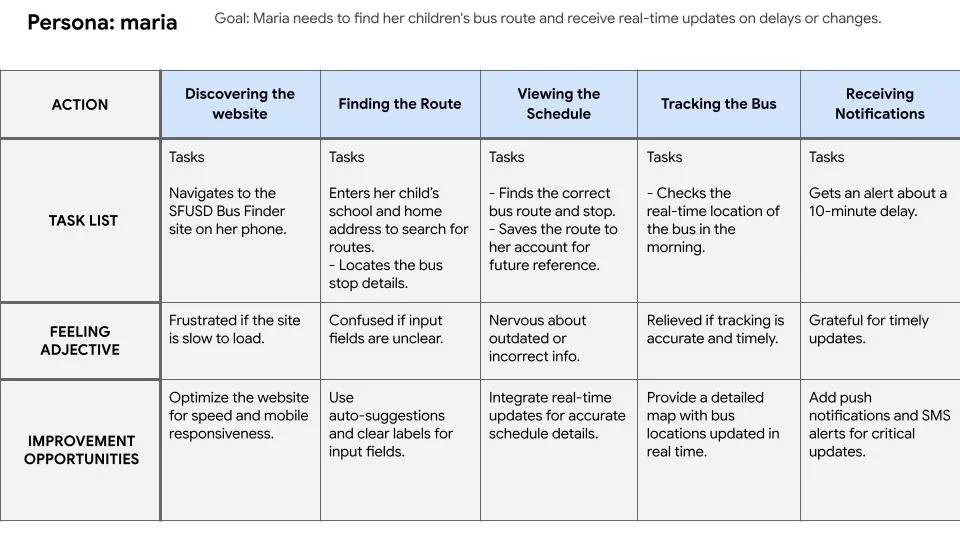
Maria is a working mom juggling her job and her children's school schedules.who needs a simple and mobile-friendly way to find accurate bus route and stop information because she struggles with outdated schedules and overly complicated tools that waste her time.
3
Alerts about delays or changes are either unavailable or sent too late, leaving parents and students unprepared.

Problem statement:
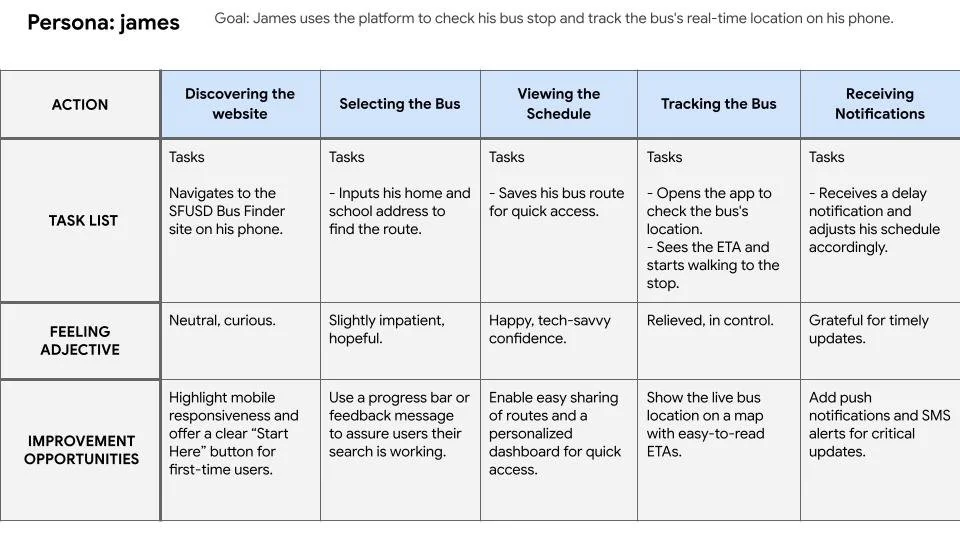
James is a tech-savvy high school freshman.who needs an easy-to-use, responsive platform to track his bus in real-time because he wants to manage his schedule independently without unnecessary delays or confusion.

Competitive Audit

Strengths:
FirstView is designed specifically for schools, offering real-time bus tracking, route history, and push notifications for parents. Its user-friendly mobile app makes it easy for parents to access information on the go. Schools benefit from customizable admin dashboards for tracking multiple buses.
Challenges:
The app is limited to districts partnered with First Student, making it inaccessible to families outside of their network. Its interface, though functional, lacks customization options, and notifications can be delayed during high-traffic periods.

Strengths:
Known for its simple and intuitive interface, this app allows parents and students to track buses in real time. It offers multi-user support, making it ideal for families with multiple children. Notifications and route updates are clear and easy to understand.
Challenges:
The design is basic and lacks advanced features, such as predictive arrival times or integration with other school systems. Additionally, its reliance on district-level subscriptions means individual parents cannot access the app without their school signing up.

Strengths:
Zūm is more than just a bus-tracking app, offering smart scheduling, real-time tracking, and carpooling features. It emphasizes sustainability, helping districts reduce emissions through route optimization. The interface is modern and visually appealing, with seamless mobile integration.
Challenges:
Zūm’s features can be overwhelming for parents and students who only need basic bus tracking. It’s designed more for district-wide use and large-scale deployments, so smaller schools or individual users may find it excessive.

Strengths:
TransLoc integrates real-time tracking and route planning with various transportation options, making it a go-to platform for students who rely on public transit. Its intuitive design and mobile responsiveness make it ideal for students familiar with transit systems.
Challenges:
TransLoc is primarily designed for public transit and lacks school-specific features like personalized bus schedules or route notifications. For students who are young or unfamiliar with transit systems, it can feel complex.

Strengths:
Google Maps offers comprehensive public transit information, covering buses, trains, and other transport modes. Its widespread usage means students and parents are already familiar with its interface, and it provides predictive arrival times and rerouting options.
Challenges:
Google Maps isn’t designed specifically for school buses, which means route and stop accuracy can be unreliable. It lacks important features like real-time updates on school-specific delays or driver instructions.
The Design Process
Site Map
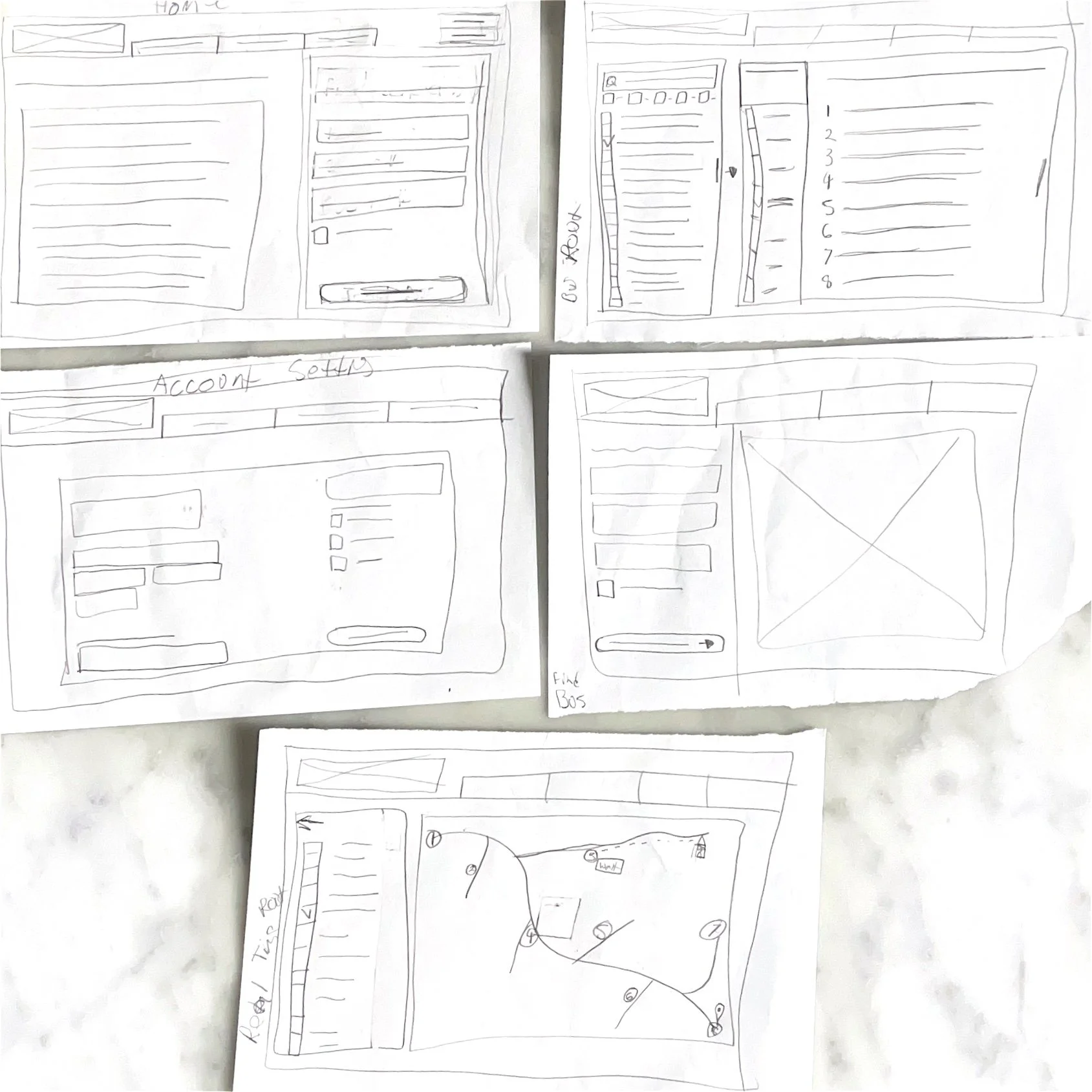
Paper wireframes
Digital wireframes
Low-fidelity prototype
The Final Design
Usability Study Wireframes


High-fidelity prototype
Switching between student and family accounts can enhance user experience significantly. Additionally, the real-time bus map feature requires more detailed information and improved functionality for better navigation.
Takeaways
Impact:
The Website will provide parents, caregivers, and students with free access to detailed school bus routes, schedules, and stop information. This resource aims to enhance convenience and ensure that families are well-informed about their transportation options.
What I learned:
It is quite surprising that San Francisco does not provide any accessible School Bus Information available on the web.